Our Use Case PDFs and blog images are only available in German. If you are interested in further information, we are happy to assist you personally. Please don’t hesitate to contact us directly.
Download the PDF here: SIEM Migration | Efficient Event Pipelining When Migrating to the Cloud
1. The Initial Situation
The customer currently uses Splunk and Splunk Enterprise Security as a SIEM successfully. There is a Splunk environment that has “grown” over the years with numerous custom add-ons such as SAP. Many different data sources are also connected. Not to forget the trained Splunk users and admins as well as the many established processes.
Due to a change of manufacturer to Azure Sentinel, the existing solution was to be replaced. The migration had to take place within a very tight timeframe of approximately three months.
How can data streams be captured and forwarded without disruption?
Cribl is a vendor-independent platform that gives customers the flexibility to route, shape, restructure, and enrich data from any source to any destination without adding new agents. Cribl processes data by eliminating distractions and, in return, helps to retain valuable data longer without breaking the customer’s infrastructure budget. With Cribl, it is possible to route a faithful copy of the raw data to a cost-effective storage location for long-term retention for compliance and audit purposes and forward it to analysis tools.
The Key: Complete Control over your Observability, Security, and Telemetry Data!
Many companies struggle to analyze growing volumes of data without having to build new infrastructure.
The complexity of the tools and the commitment to a specific vendor make it difficult to send data to third-party analytics platforms.
Security teams are flooded with data from various sources and formats. This makes it difficult to correlate events and thus detect and respond to security vulnerabilities. In addition, there is compliance with data protection and compliance guidelines.
The resulting challenge for companies is a steadily increasing consumption of resources, ever higher demands on data management and data analysis, and a considerable financial burden.
Cribl – Feature Highlights + Easy Handling
Quickconnect – Stream sources to destinations with simple drag-and-drop. Easier and faster data acquisition and forwarding from point A to point B.
Flex-Deploy – On-premise, in the cloud, or hybrid. Choose the model that best suits your needs.
Use the release, version, and archive management to track configuration changes to ensure auditability.
Synthetic Testing (Replay) – After a change, data samples from a low-cost storage can be replayed to answer questions that you did not foresee in advance.

2. The Use Case
The media company is one of the leading entertainment and e-commerce providers in German-speaking countries. The entertainment portfolio is complemented by digital consumer brands in the Commerce & Ventures and Dating & Video segments.
The management’s requirement was: “The SIEM solution must be replaced by Microsoft Azure Sentinel within three months.”
The Solution from NetDescribe
Cribl and NetDescribe show you how you can simplify your data management immediately and how the move to the cloud will be a success.
Cribl’s data engine helps you analyze, collect, process, and forward your data at any scale. On the following pages, learn how NetDescribe and the Cribl portfolio offer you the choice, control, and flexibility to support your IT and security operations now and in the future.

The Cribl Family
Cribl Stream™ – helps you process machine data – logs, measurement data, application data, metrics, etc. – in real time and transmits it to the analysis platform of your choice.
Cribl Edge™ – helps you collect and process observability data. You can deliver logs, metrics, application data, etc. in real time from your Linux and Windows machines, apps, microservices, etc. to Cribl Stream or any supported destination.
With Cribl Search™, you can search, investigate, and analyze machine data – logs, instrumentation data, application data, metrics, etc. – without first moving it to a special storage. This can be done with data located on Cribl Edge or in a data lake such as Amazon S3.
3. Requirements Analysis and Implementation
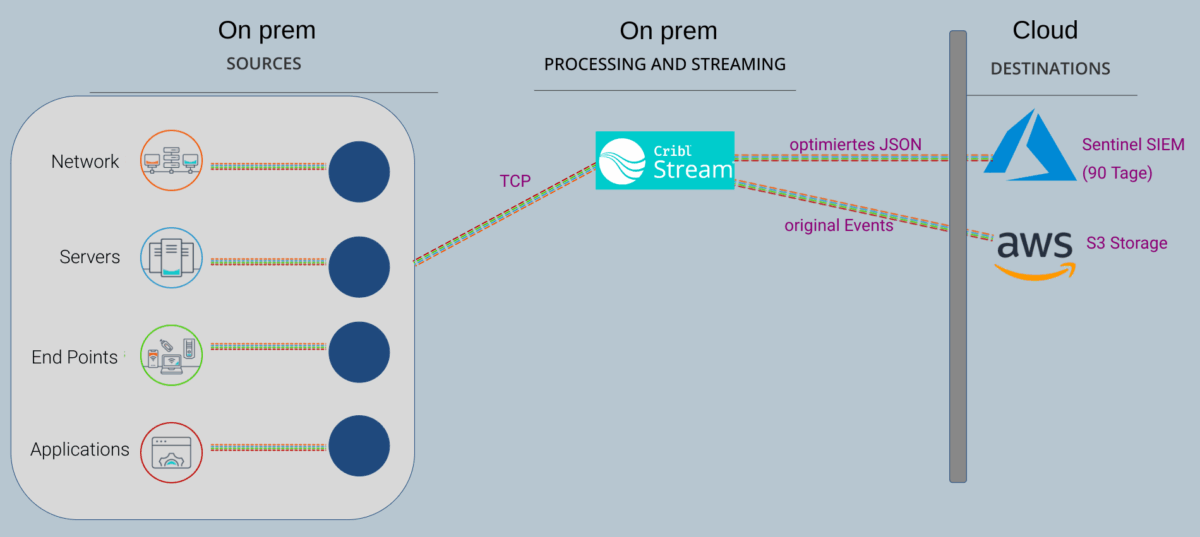
The SIEM change from Splunk to Azure Sentinel within three months presented the NetDescribe team with an interesting challenge. After an initial requirements analysis, Cribl was introduced as a “data hub”. The customer then immediately decided on a proof of concept. Within a very short time, Cribl was installed on prem and the existing Splunk environment was adapted so that current data was additionally sent to Cribl and forwarded from there, optimized, to the new SIEM system.

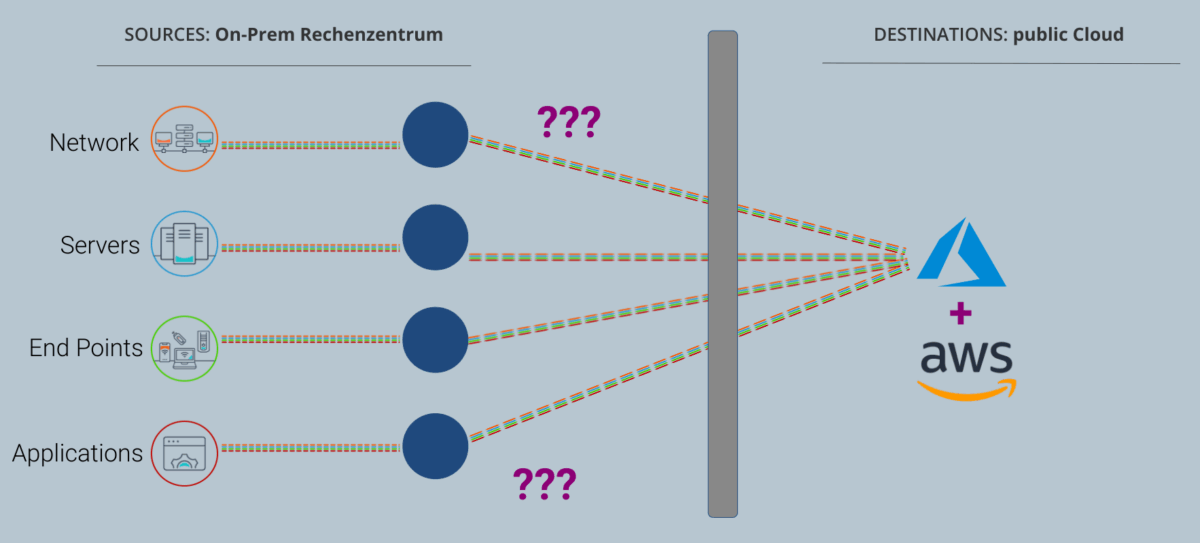
In the initial situation, all sources (network, services, end points, and applications) as well as the destination were located in the on-prem data center and were collected and forwarded via Splunk.

The question: What should the new target environment, the destination, look like? It was clear that it would be in a public cloud. But how could the data be migrated there?

Another challenge was the data storage guidelines. Azure Sentinel only stores 90 days, but the logs were needed for a year.
The solution: An additional connection of the S3 storage (data lake) via Cribl to aws.
And this is where Cribl Stream comes into play, ensuring the efficient processing of logs, metrics, traces, IT, and security-relevant data in real time. It gives teams the flexibility to collect the data they want, put it into the formats they want, send it exactly where it needs to go, and replay the data as needed.
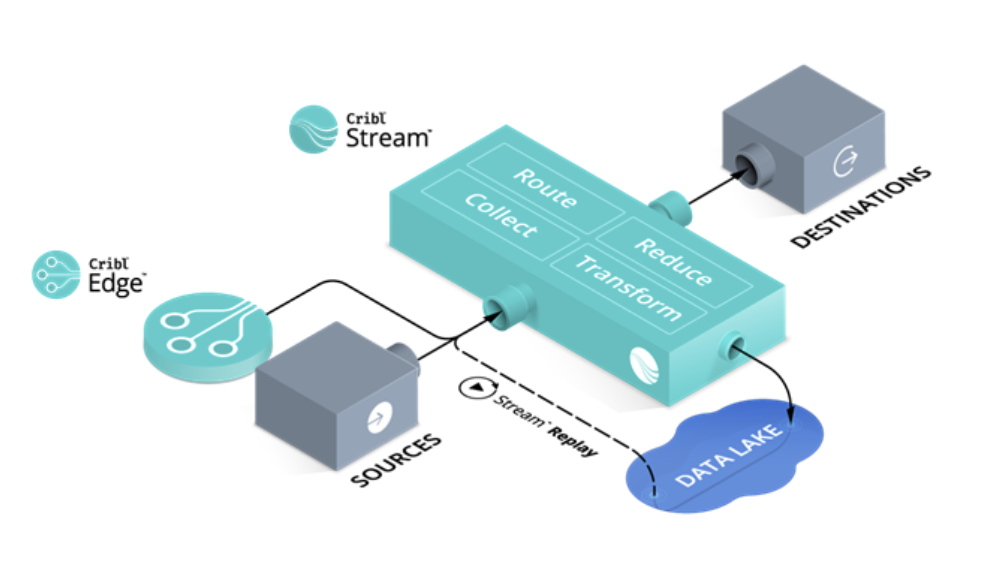
Source: Cribl
Cribl Stream in detail shows the great advantage of the product. It already “understands” many sources out of the box and can control them, which means less configuration effort and therefore time and cost savings.
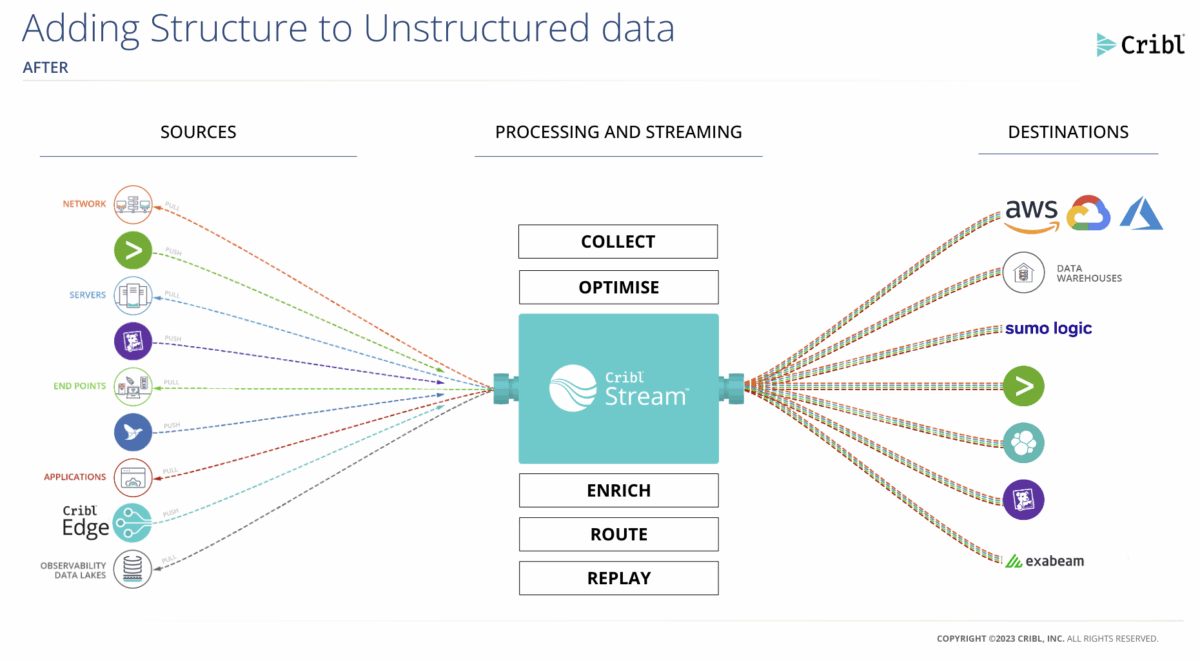
Source: Cribl
And for all the tech fans, we’re going one step further into the highly scalable architecture here.
Stream can receive push data from sources such as Splunk, HTTP, Elastic Beats, etc. and retrieve data from Kafka, Kinesis Streams, S3, etc. or even external inputs such as weather data, air quality and everything else. Stream data to Splunk, AWS Kinesis Streams, etc., as well as to destinations that support batch or non-streaming outputs, such as S3-compatible storage, file system/NFS, MinIO, Google Cloud Storage, and Azure Blob Storage.

Source: Cribl
Cribl Stream maximizes the value of your observability data by transforming and contextualizing data from other sources in real time, increasing the value of your analytics tools.
According to your needs!

Source: Cribl
In the migration phase, the data was duplicated and sent in parallel to two destinations: OLD: Splunk and NEW: Azure Sentinel + S3 Storage
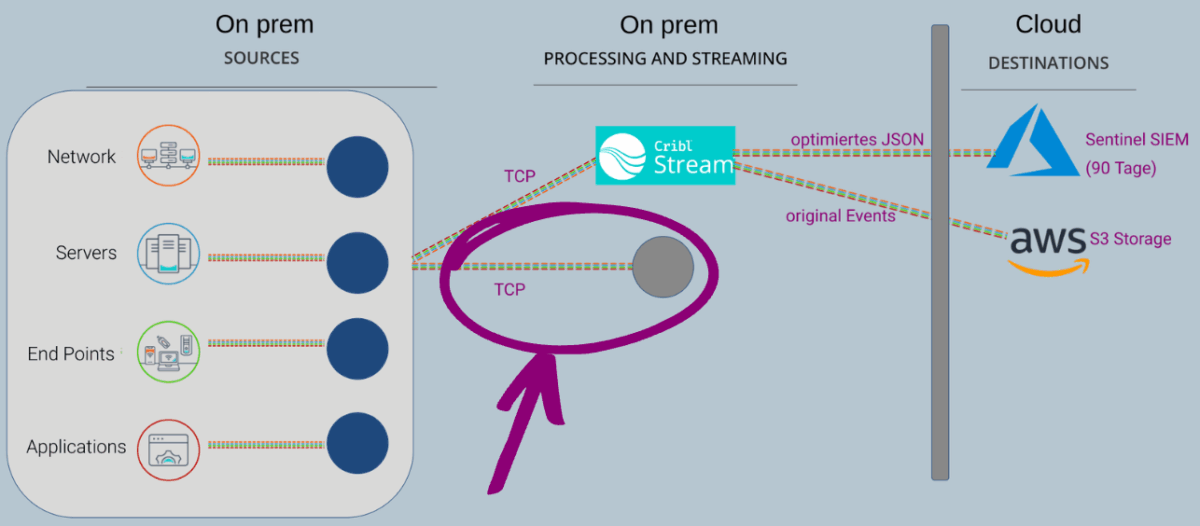
Result: The old Splunk solution was decommissioned and all events were streamed to the cloud platform via Cribl. This completed the goal of moving to the new SIEM solution in the cloud.
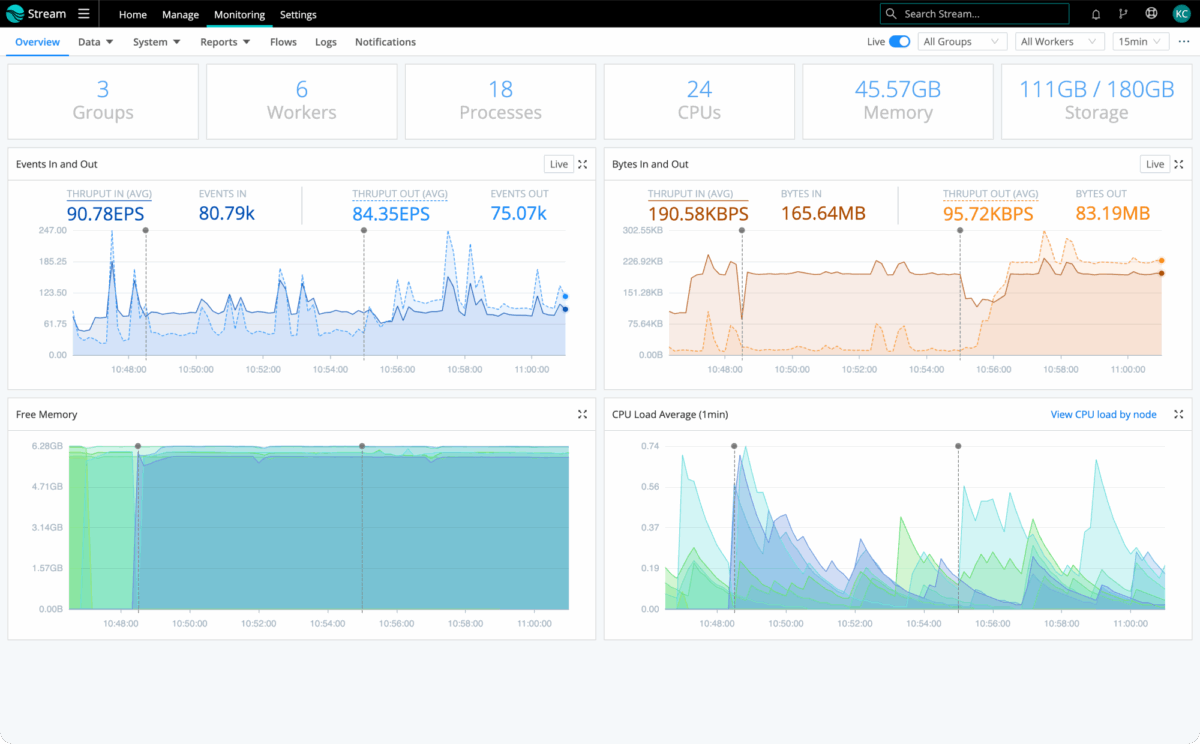
The monitoring dashboard is a single source of truth for all IT and security data flowing through Stream. Cribl Stream provides users with a bird’s-eye view of their data – from source to destination. With just a few clicks, users can view detailed dashboards that display traffic, capture jobs, tasks, and general system metrics.
Source: Cribl
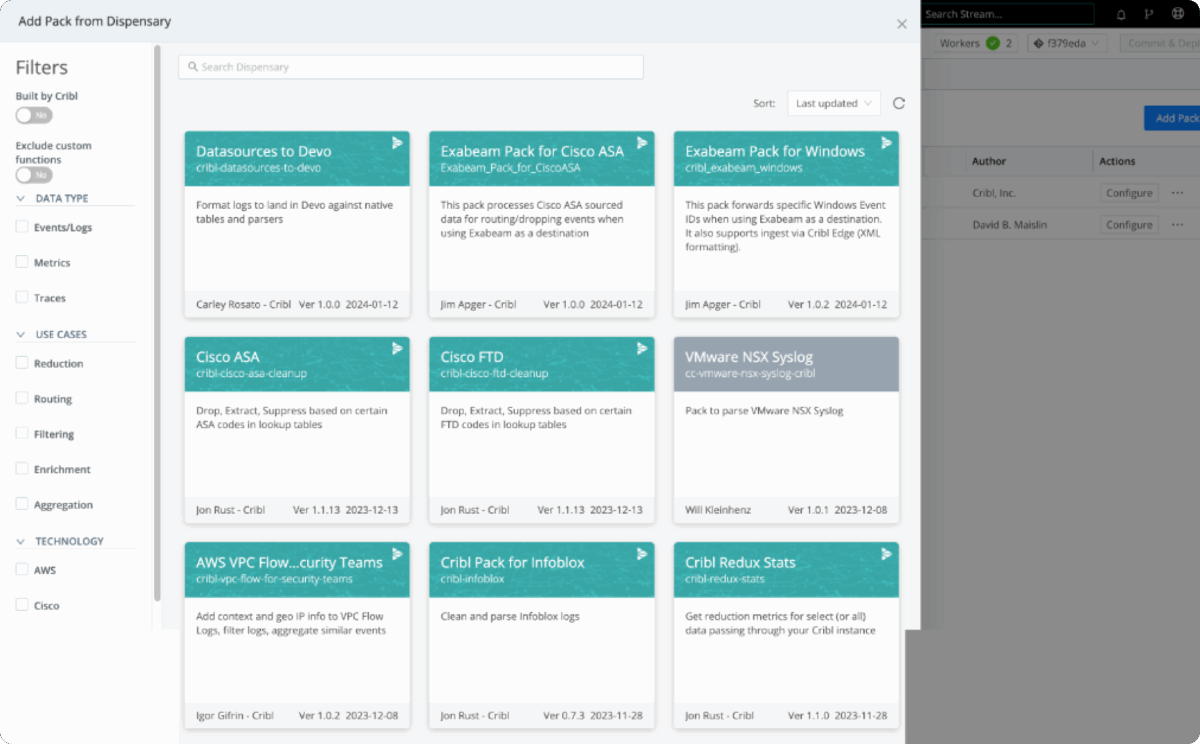
Cribl Packs provide Stream users with instant value with pre-built routes, pipelines, examples, lookups, and knowledge objects. Immediately see the savings without writing a single expression, regex, or lookup.
Source: Cribl
4. The Results
- All the rules for data preparation that had been configured, continuously adapted, and optimized in Splunk for years could be easily transferred to Cribl.
- Data enrichments were easily ported from Splunk to Cribl.
- Maximum time savings when connecting the data source. Without Cribl, the effort would have been much greater and would have taken several months instead of a few days.
- The only effort for the customer was the transfer of the SIEM rules from Splunk to Azure Sentinel. Due to the same field assignments in Splunk and Azure Sentinel, an efficient and fast changeover was possible with Cribl.
- The independence gained from a specific manufacturer now opens up flexible opportunities to master future challenges.

Cribl – Business Benefits
With Cribl, you get complete control over all observability data and unprecedented flexibility in using any tools without the use of new agents.
No agent overload → You don’t have to load any additional agents
No data overload → You can handle large amounts of data
No bandwidth restrictions → You reduce your transmission costs
Long-term retention → Define retention according to your requirements
Onboarding unknown data records → Fast onboarding of new data sources with visual tools
The Cribl Stream™ Functions at a Glance
Cribl Stream acts as a universal receiver and collector of log and metric data. With Stream, you can retrieve, transform, analyze, and correlate data from any source and send it to any destination or even multiple destinations without the need for additional tools.
Stream can receive push data from sources such as Splunk, HTTP, Elastic Beats, Kinesis, Kafka, TCP JSON and retrieve data from Kafka, Kinesis Streams, Azure Event Hubs, SQS, S3, Microsoft Office 365 or even external inputs such as weather data, air quality and anything else your company needs for better decisions.
Stream data to Splunk, AWS Kinesis Streams, SQS and CloudWatch Logs, Elasticsearch, Honeycomb, TCP JSON, Syslog, Kafka Azure Event Hubs and Monitor Logs, StatsD and StatsD Extended, Graphite, InfluxDB, Wavefront, SignalFx and more, as well as to destinations that support batch or non-streaming outputs, such as S3-compatible storage, file system/NFS, MinIO, Google Cloud Storage, and Azure Blob Storage.
Cribl Stream maximizes the value of observability data by transforming and contextualizing data from other sources in real time, thereby increasing the value of your analysis tools.
Collect – Send data from anywhere to anywhere.
Reduce – Eliminate useless data to control costs. You can keep a faithful copy in a cost-effective location and replay it when needed.
Shape – Gain meaningful insights from your data.
Route – Use your data where it has the most value and send the right data to the right destinations.
Replay – Store your data for day X in a cost-effective storage location and retrieve it when needed to increase security and avoid operational disruptions and failures.
Download the PDF here: SIEM Migration | Efficient Event Pipelining When Migrating to the Cloud